
Some of the most powerful and influential machine learning algorithms are Neural Networks. They are applicable to a wide range of problems: including supervised prediction, language/image/video generation, computer vision, and many more. A key step to building these models is hyperparameter tuning. In this article, I will cover how to tune models in Keras. All coding examples shown are done in Python, and available on my Github.

advanced model tuning

Advanced Model Tuning with Keras – image by author

Video

For those who prefer video content, below you can watch me work through the content presented in this article:

Why Tune Models in Keras?

Keras is a popular framework for building Neural Networks, and offers a simple API with which to construct even very complex models. This framework really makes the task of assembling Neural Networks easier! Possible backends for Keras include JAX, TensorFlow, or PyTorch.  Here we’ll make use of TensorFlow.

Hyperparameter tuning is a fundamental step in building any machine learning application, and Neural Networks are no different. This involves properly setting the number of layers, neurons per layer, activation functions, etc, to maximize performance. As such, for any given problem is it essential to tune our model to the specific task at hand.

Getting Started

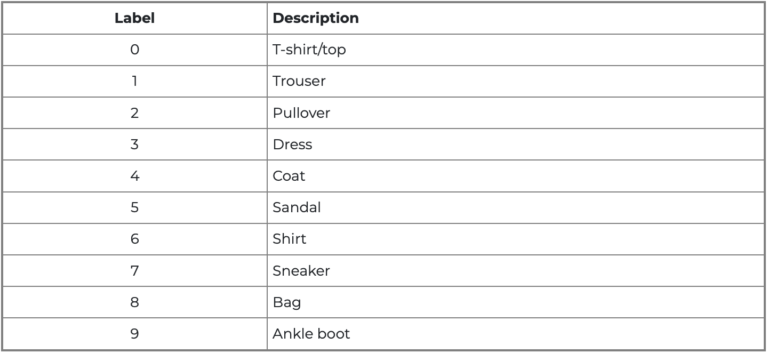
We will be working with the MNIST Fashion dataset, that is available through the Keras package. Our goal will be to build a classifier that can properly label a 28×28 image of a clothing item. There are a total of 10 different clothing items in this dataset, labelled 0 through 9.  

advanced model tuning

Figure 1: breakdown of the labels in MNIST fashion dataset (image from keras.io)

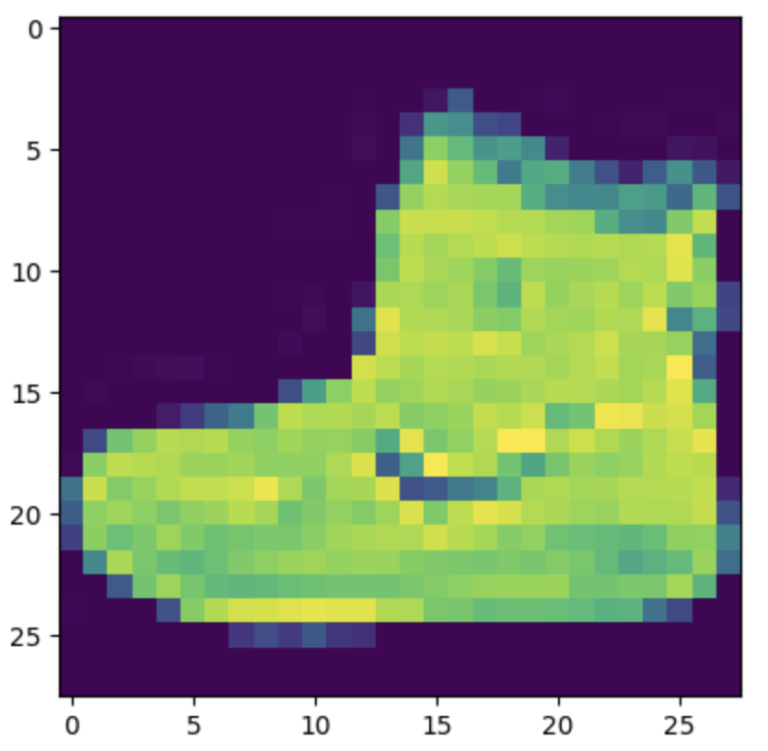
A total of 60,000 images are available for training, and 10,000 images for testing. An example of one of these images is shown below:

advanced model tuning

Figure 2: example image (ankle boot) from MNIST Fashion

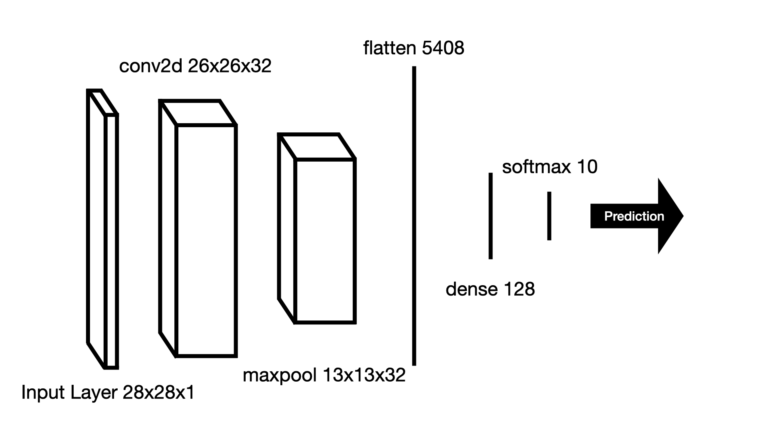
We will build a Convolutional Neural Network (CNN) to try to tackle this problem. Let’s start with a design that involves a single 2D convolutional layer, followed by a 2D max pooling layer, and then flattening the result before passing through a dense layer. We will end things off with a softmax output layer.  This design is illustrated in Figure 3:

advanced model tuning

Figure 3: initial design of the CNN to tune, including dimensions for each layer

Benchmark Performance

To measure the effectiveness of our tuning efforts, we will first need to measure how our model performs on the data as-is. As such, let’s import the packages we will need and load in the data:

from sklearn.metrics import classification_report
import tensorflow as tf
from keras import Input, Model, layers, datasets, utils
import keras_tuner as kt

tf.config.run_functions_eagerly(True)
utils.set_random_seed(42)

(x_train, y_train), (x_test, y_test) = datasets.fashion_mnist.load_data()

Some basic preprocessing will also be required, let’s take care of that now:

# normalize the data
x_train = x_train.astype("float32") / 255.0
x_test = x_test.astype("float32") / 255.0

# add a dimension for the image channel
x_train = x_train[..., tf.newaxis]
x_test = x_test[..., tf.newaxis]

Now we can build our model. Note I will be making use of Keras’ functional API to assemble the Neural Network:

# define our optimizer
optimizer = tf.keras.optimizers.Adam(learning_rate=1e-4)

# define input
inputs = Input(shape=(28, 28, 1))

# create layers
conv = layers.Conv2D(filters=32, kernel_size=(3, 3), activation="relu")(inputs)
pool = layers.MaxPooling2D((2, 2))(conv)
flat = layers.Flatten()(pool)
dense = layers.Dense(128, activation="relu")(flat)
outputs = layers.Dense(10, activation="softmax")(dense)

# create the model
model = Model(inputs=inputs, outputs=outputs)

# compile the model
model.compile(optimizer=optimizer, loss='sparse_categorical_crossentropy', metrics=['accuracy'])

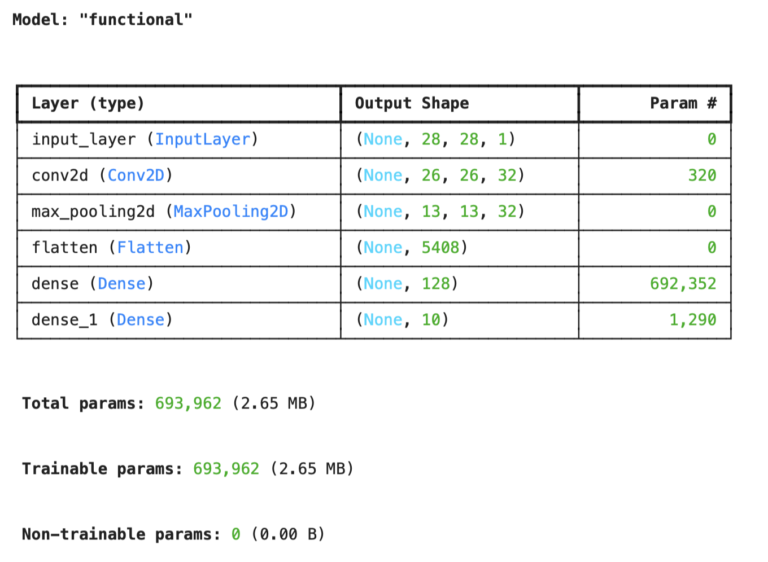
We can inspect the model to get a breakdown for each layer in the network, and to see how many parameters are involved with the model:

# Inspect the model
model.summary()
advanced model tuning

There are just under 700 thousand parameters to our model. Let’s now train the model, with 10 epochs and a batch size of 64. We will leave 10% of the training data for validation:

# Train the model
model.fit(x_train, y_train, epochs=10, batch_size=64, validation_split=0.1)
advanced model tuning

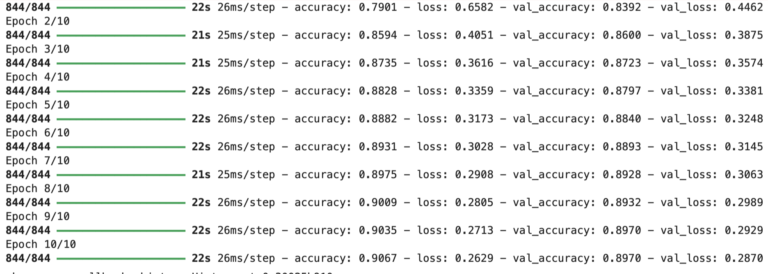
Here we can see how the model performs during each epoch in the training. It is a good sign that the accuracy improves while the loss decreases at each successive step. Also we notice that the performance on the validation set is a bit worse when compared to the training results, which is expected.

How will our model perform on the held-out test set? Let’s find out now:

# Evaluate on test data
test_loss, test_acc = model.evaluate(x_test, y_test)
print(f"Test accuracy: {test_acc:.4f}, test loss: {test_loss:.4f}")
313/313 ━━━━━━━━━━━━━━━━━━━━ 3s 8ms/step - accuracy: 0.8933 - loss: 0.3010
Test accuracy: 0.8933, test loss: 0.3010
# Generate classification report
y_pred = model.predict(x_test).argmax(axis=1)
print(classification_report(y_test, y_pred))
advanced model tuning

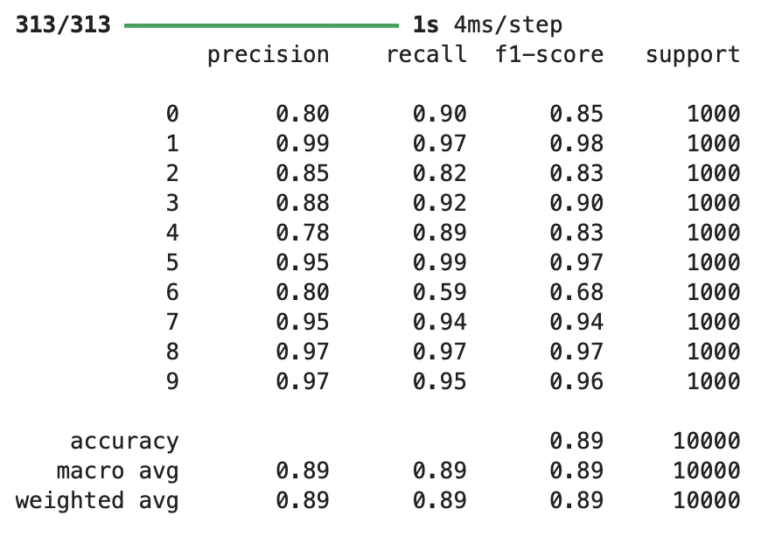
Our baseline has a mean score of 0.89 on accuracy, precision, recall, and F1. The loss value on the test set is 0.3010.

Advanced Model Tuning Attempt #1

We can see the model performs with an accuracy of ~89% out-of-the-box on the test data. But what is the best way to tune our model, to find an ideal architecture? Lets see what can be done with keras-tuner in terms of:

  • number of neurons per layer
  • learning rate
  • activation functions

In order to do this, we must encapsulate our model implementation within a function, along with the definition of the parameter space we want to explore. Let’s go ahead and do that now:

def build_model(hp):
    # Specify parameter range
    filters = hp.Int("filters", min_value=26, max_value=38, step=2)
    activation1 = hp.Choice("activation1", ["relu", "tanh"])
    activation2 = hp.Choice("activation2", ["relu", "tanh"])
    units = hp.Int("units", min_value=8, max_value=512, step=2)
    lr = hp.Choice("learning_rate", [1e-3, 1e-4, 1e-5])
    
    # Define input
    inputs = Input(shape=(28, 28, 1))
    
    # Create layers
    conv = layers.Conv2D(filters=filters, kernel_size=(3, 3), activation=activation1)(inputs)
    pool = layers.MaxPooling2D((2, 2))(conv)
    flat = layers.Flatten()(pool)
    dense = layers.Dense(units=units, activation=activation2)(flat)
    outputs = layers.Dense(10, activation="softmax")(dense)

    # Create the model
    model = Model(inputs=inputs, outputs=outputs)

    # Compile the model
    opt = tf.keras.optimizers.Adam(learning_rate=lr)
    model.compile(optimizer=opt, loss='sparse_categorical_crossentropy', metrics=['accuracy'])

    return model

The function build_model takes in 1 argument, hp, that is required by keras-tuner. We first define the parameter space we want to explore (lines 3 to 7), before constructing the model (lines 10 and onwards). 

We can now run the hyperparameter tuning algorithm. In this case, we will make use of Randomized Search to explore the parameter space. For the sake of time, only 5 trials we be done:

tuner = kt.RandomSearch(build_model, objective='val_accuracy', max_trials=5)
tuner.search(x_train, y_train, epochs=10, validation_split=0.1, batch_size=64)

Once this completes, we can view the optimal parameters found by the algorithm:

# Display best parameters
tuner.get_best_hyperparameters(num_trials=1)[0].values
{'filters': 32,
 'activation1': 'relu',
 'activation2': 'tanh',
 'units': 168,
 'learning_rate': 0.001}

There are some notable changes with the configuration, when compared with the baseline model! In particular, the number of units and activation function in the dense layer have been changed, and the learning rate is increased. 

Let’s get a summary of the best model architecture found: 


# Get the best model and investigate
models = tuner.get_best_models(num_models=1)
best_model = models[0]
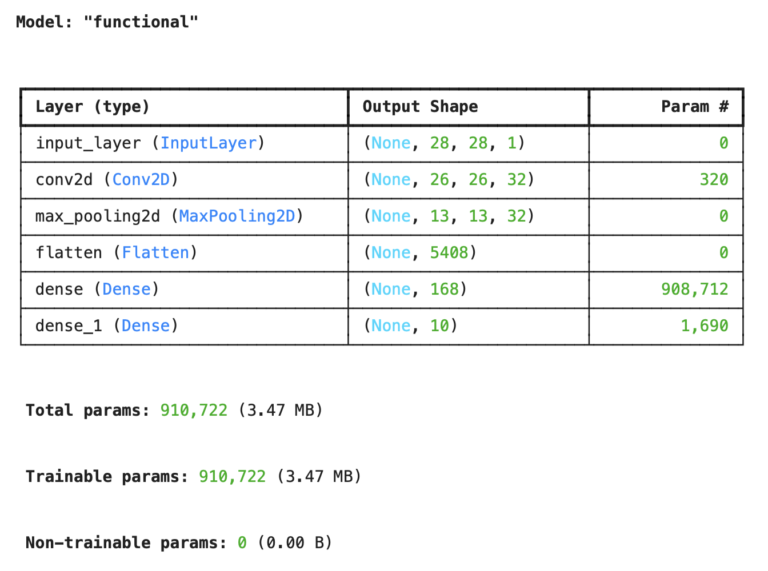
best_model.summary()
advanced model tuning

What stands out here is the number of trainable parameters: it has increased to just over 900 thousand! That is a significant increase, and should keep us concerned about overfitting

Let’s now evaluate the best model found on the held-out test set:

# Evaluate on test data
test_loss, test_acc = best_model.evaluate(x_test, y_test)
print(f"Test accuracy: {test_acc:.4f}, test loss: {test_loss:.4f}")
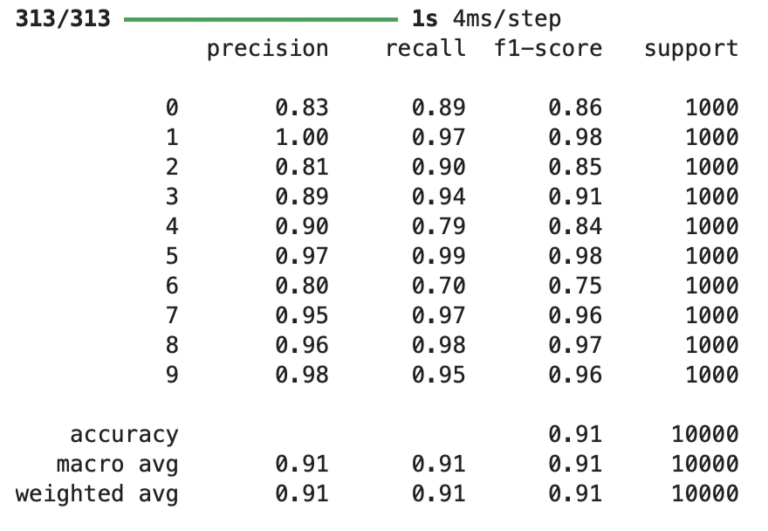
313/313 ━━━━━━━━━━━━━━━━━━━━ 3s 8ms/step - accuracy: 0.9069 - loss: 0.2665
Test accuracy: 0.9069, test loss: 0.2665
# Generate classification report
y_pred = best_model.predict(x_test).argmax(axis=1)
print(classification_report(y_test, y_pred))
advanced model tuning

We can see here an improvement in performance, as well as the loss, over the test set when compared with the baseline model. This is true with the overall average results, and for tricky classes like 6 (shirt) that performed poorly previously.

Advanced Model Tuning Attempt #2

Now let’s try to extend our tuning, to incorporate variation in:

  • number of dense layers
  • batch size
  • regularization (dropout)

To do this enhanced tuning, we’ll build upon the build_model function we saw in the previous section and encapsulate it within a class MyHyperModel:

class MyHyperModel(kt.HyperModel):

    def build(self, hp):
        # Specify parameter range
        filters = hp.Int("filters", min_value=26, max_value=38, step=2)
        activation1 = hp.Choice("activation1", ["relu", "tanh"])
        activation2 = hp.Choice("activation2", ["relu", "tanh"])
        units = hp.Int("units", min_value=8, max_value=512, step=2)
        lr = hp.Choice("learning_rate", [1e-3, 1e-4, 1e-5])
    
        # Define input
        inputs = Input(shape=(28, 28, 1))
    
        # Create layers
        conv = layers.Conv2D(filters=filters, kernel_size=(3, 3), activation=activation1)(inputs)
        pool = layers.MaxPooling2D((2, 2))(conv)
        flat = layers.Flatten()(pool)
        dense = layers.Dense(units=units, activation=activation2)(flat)
        for i in range(hp.Int('num_layers', 0, 2)):
            dense = layers.Dense(units=units, activation=activation2)(dense)
        if hp.Boolean("dropout"):
            dense = layers.Dropout(rate=0.25)(dense)
        outputs = layers.Dense(10, activation="softmax")(dense)

        # Create the model
        model = Model(inputs=inputs, outputs=outputs)

        # Compile the model
        opt = tf.keras.optimizers.Adam(learning_rate=lr)
        model.compile(optimizer=opt, loss='sparse_categorical_crossentropy', metrics=['accuracy'])

        return model

    def fit(self, hp, model, *args, **kwargs):
        return model.fit(
            *args,
            batch_size=hp.Choice("batch_size", [32, 64, 128]),
            **kwargs,
        )

Notice the build_model function from the previous section is now the class method build, with some changes to how the dense layers are built. In addition, since the batch size is specified when calling the fit method, our MyHyperModel class also has a fit method that facilitates the choice between 3 different batch_size values.

We can now run a Randomized Search, with 5 trials like before. Notice that we pass into kt.RandomSearch() an instance of our class MyHyperModel:

tuner = kt.RandomSearch(MyHyperModel(), objective='val_accuracy', max_trials=5)
tuner.search(x_train, y_train, epochs=10, validation_split=0.1)

Once this finishes, we can view the best hyperparameter configuration:

# Display best parameters
tuner.get_best_hyperparameters(num_trials=1)[0].values
{'filters': 30,
 'activation1': 'relu',
 'activation2': 'relu',
 'units': 466,
 'learning_rate': 0.001,
 'num_layers': 2,
 'dropout': False,
 'batch_size': 128}

We can see some more notable changes with the model found here. In particular, 2 additional dense layers were added to the model, and the number of neurons in these layers is significantly increased. In addition, the batch size was increased to 128.

Let’s get a summary for the model found here:

# Get the best model and investigate
models = tuner.get_best_models(num_models=1)
best_model = models[0]
best_model.summary()
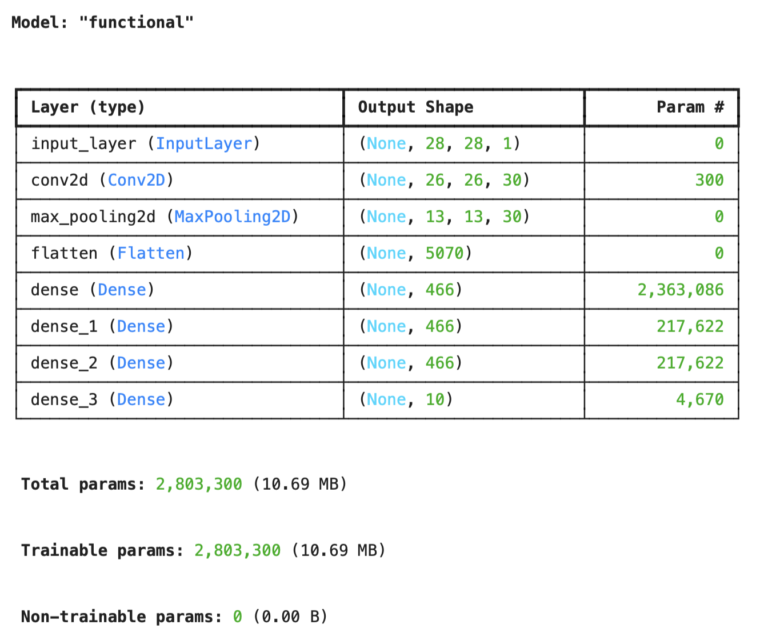
advanced model tuning

There are now more than 2 million trainable parameters, more than double over the previous attempt!

Now the real question is: how does this model perform on the held-out test set? Let’s check that:

# Evaluate on test data
test_loss, test_acc = best_model.evaluate(x_test, y_test)
print(f"Test accuracy: {test_acc:.4f}, test loss: {test_loss:.4f}")
313/313 ━━━━━━━━━━━━━━━━━━━━ 3s 9ms/step - accuracy: 0.9077 - loss: 0.3166
Test accuracy: 0.9077, test loss: 0.3166
# Generate classification report
y_pred = best_model.predict(x_test).argmax(axis=1)
print(classification_report(y_test, y_pred))
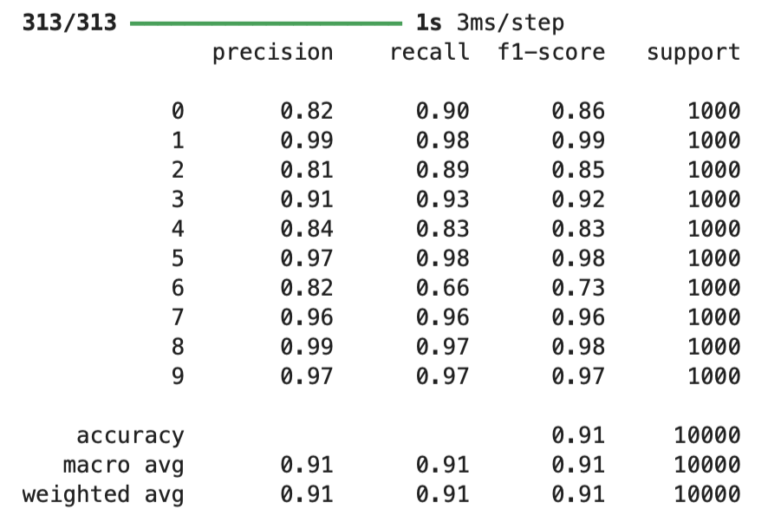
advanced model tuning

Superficially this model seems to have performed about the same as the previous attempt, and on average this is the case. However, for specific classes changes are seen. In particular, this model does not perform as well on class 6 (shirt) as the previous attempt.

Final Remarks

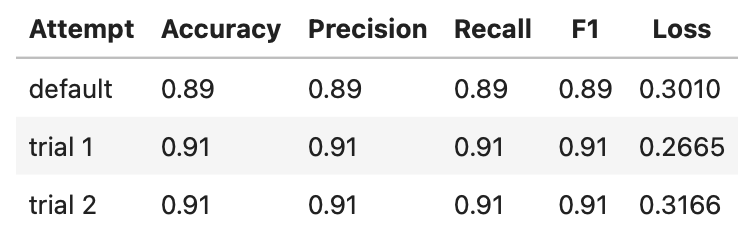
We can summarize the results obtained on the test set in the table below:

advanced model tuning

Not surprisingly, the performance of our model improves when tuning is added as opposed to the default/baseline setup. In particular, the classification report shows that for particularly troublesome categories (like 6), the model improves quite a lot when tuning is applied.

It would be expected that the model from trial 2 would perform best, however it is tied with the model from trial 1 in terms of performance. In terms of loss, it actually performs worse! Note that because of the stochastic nature of Randomized Search, different runs will produce different results. Here we only used 5 different trials, which is not enough to properly explore the parameter space here. Many more trials should be added to given a reasonable chance to find an optimal configuration.

I hope you enjoyed this article, and gained some value from it. If you would like to take a closer look at the code presented here, please take a look at my GitHub. If you have any questions or suggestions, please feel free to add a comment below. Your input is greatly appreciated. 

Interested in signing up for my Monthly Newsletter? At the end of each month I will send out this free newsletter to each of my subscribers by email. This is the best way to stay on top of my latest content. Sign up for the newsletter here! 

Related Posts

Hi I'm Michael Attard, a Data Scientist with a background in Astrophysics. I enjoy helping others on their journey to learn more about machine learning, and how it can be applied in industry.

5 2 votes
Article Rating
Subscribe
Notify of
guest

2 Comments
Oldest
Newest Most Voted
Joseph
Joseph
3 months ago

Very interesting and detailed

2
0
Would love your thoughts, please comment.x
()
x